ThorVG v1.1 - Rising the Standard

Updated: Jul 24

A. Overview
Following the major architectural milestone of ThorVG v1.0, this release focuses on refining the engine for real-world production use. ThorVG v1.1 delivers significant improvements in rendering performance, standards compliance, platform integration, and developer experience—making the engine faster, more compatible, and easier to integrate across diverse environments.
This release introduces substantial optimizations for the GPU rendering pipeline, expands support for the Lottie and SVG specifications, adds experimental OpenType (OTF) font support, and further enhances the WebCanvas ecosystem with a pluggable font architecture and multi-threading support. Together, these improvements strengthen ThorVG as a lightweight, high-performance vector graphics engine capable of serving everything from embedded systems to modern web and desktop applications.
Beyond the rendering engine itself, v1.1 continues to expand the ThorVG ecosystem with new platform integrations, improved tooling, and interactive demonstrations that simplify adoption and showcase real-world capabilities. These efforts reflect ThorVG's continued evolution as a production-ready vector graphics platform for cross-platform graphics applications.
B. What's New in v1.1?
Following the major architectural milestone of v1.0, ThorVG v1.1 focuses on refining rendering quality, expanding format compatibility, and strengthening the overall development ecosystem. This release delivers significant improvements across rendering performance, standards compliance, platform integration, and developer workflows—making ThorVG faster, more compatible, and easier to integrate into real-world applications.
Significant GPU rendering performance improvements through rendering pipeline optimizations and batching enhancements
More accurate and consistent stroke rendering, delivering improved visual fidelity across CPU and GPU engines
Experimental OpenType (OTF) font support together with an enhanced font loading architecture for WebCanvas
Expanded Lottie animation capabilities, including experimental Dynamic Tweening and faster Expressions processing
Improved Lottie and SVG specification compliance, delivering better compatibility with real-world content
New platform and ecosystem enhancements, including Android OpenGL support, WebCanvas multi-threading, and pluggable font providers
Continued improvements in rendering quality, stability, and overall production readiness
We recommend developers to carefully review this release note before upgrading existing projects or starting new ones with v1.1. See the F. API & Integration Updates for details.
C. Highlights
C.1 GPU Engines Performance Improvements
ThorVG v1.1 introduces a major redesign of the GPU rendering pipeline, reducing driver overhead and significantly improving rendering throughput across both GL and WebGPU backends. The redesign focuses on geometry preprocessing, aggressive batching, shared texture caching, and unified optimization infrastructure across GL and WebGPU. This changes include:
Reduced GPU driver overhead by moving per-object model transformations from per-draw shader uniforms to CPU-side geometry preprocessing.
Enhanced batching for solid fills and stencil-cover rendering, significantly reducing draw-call and render-task overhead.
Shared GPU texture caching eliminates redundant texture uploads, substantially improving image rendering performance.
Optimized tessellation fast paths improve rendering throughput while maintaining rendering correctness.
Unified optimization infrastructure shared between the GL and WebGPU backends for better maintainability and scalability.
Results
The new GPU rendering pipeline delivers substantial performance improvements across a variety of rendering workloads:
OpenGL: Typical improvements range from 11% to 88%, with peaks reaching 139.5% in mesh-intensive workloads.
WebGPU: Up to 13% higher rendering throughput, with consistent gains across geometry-intensive workloads.

OpenGL / WebGL | WebGPU | |
|---|---|---|
Rounded Rects with Stroking | 1.17x fps | 1.13x fps |
100 Lottie Animations | 1.11x fps | 1.00x fps |
Big Mesh Donut | 2.40x fps | 1.11x fps |
Many Stars | 1.88x fps | 1.05x fps |
Many Images | 1.85x fps | 1.00x fps |
These optimizations significantly improve GPU utilization and rendering scalability, particularly for complex vector graphics and Lottie animations.
GL vs WebGPU
In addition to feature completeness, ThorVG's WebGPU backend now delivers significant performance gains across a broad range of rendering workloads. Internal primitive rendering benchmarks show an average rendering throughput improvement of approximately 1.8× compared to the GL backend, with the largest gains observed in stroke rendering, gradients, and image rendering. Even for general vector rendering, WebGPU demonstrates competitive performance across general vector rendering workloads.

Benchmark results were obtained using ThorVG's benchmark application on Apple M1 (macOS). Actual performance may vary depending on the hardware, operating system, graphics driver, and rendering workload.
C.2 Stroke Rendering Enhancements
Over time, users reported numerous cases where rendered strokes differed from the expected visual result, particularly when non-uniform transformations were involved. These issues originated from the order of operations in the stroke processing pipeline.
Previously, ThorVG transformed the input path before generating its stroke outline:
Before: Original Path -> Transform -> Stroke Outline Generation
In v1.1, the pipeline has been revised to generate the stroke outline from the original path geometry before applying transformations:
After: Original Path -> Stroke Outline Generation -> Transform
This architectural change resolves a broad range of previously reported stroke rendering issues, delivering more predictable and visually consistent results while bringing ThorVG's stroke behavior closer to modern vector rendering standards.
C.3 OpenType (OTF) Font Support
ThorVG v1.1 introduces experimental OpenType (OTF) font support, expanding the font ecosystem beyond TrueType (TTF). This allows applications to render a wider range of modern OpenType fonts while keeping the implementation lightweight and compatible with the existing text pipeline.

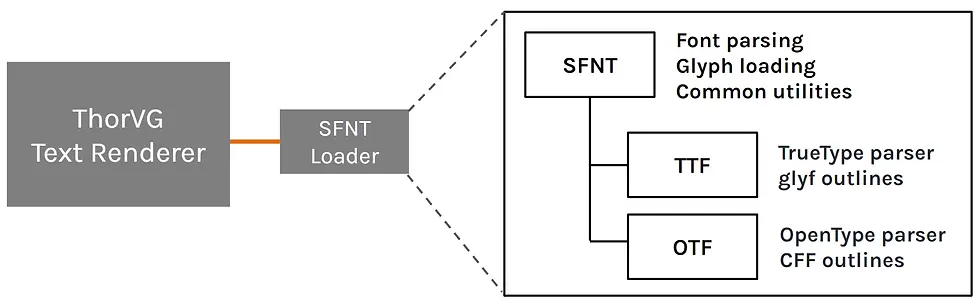
The initial implementation focuses on basic glyph parsing and rendering, providing a solid foundation for future OpenType feature support while preserving ThorVG's compact architecture. Alongside the new loader, the font subsystem has been reorganized to share common SFNT infrastructure between TrueType and OpenType fonts. This update includes:
Experimental OpenType (.otf) font loader
Shared SFNT infrastructure for both TTF and OTF
Basic OpenType glyph parsing and rendering
Integrated with the existing text rendering pipeline
Enabling OTF Support
Enable the OTF loader at build time using Meson:
meson setup build-Dloaders="otf"The corresponding compile-time feature macros are:
THORVG_SFNT_LOADER_SUPPORT
THORVG_OTF_LOADER_SUPPORT
The repository layout has also been updated to reflect the shared SFNT implementation:
thorvg/src/loaders/ttf -> thorvg/src/loaders/sfntOTF support is currently experimental and provides the core functionality required for basic glyph rendering. Additional OpenType typographic features will be introduced incrementally in future releases.
C.4 Lottie Dynamic Tweening Support (Experimental)
Tweening is the process of smoothly interpolating animation values between a starting state and a target state over time. It is widely used to create natural transitions in interactive animations and user interfaces.
Conventional tweening assumes the target remains fixed until the transition completes. Dynamic Tweening removes this limitation by allowing a new transition to begin even while another tween is already in progress. The current interpolated frame is captured as the new starting point, and the newly requested frame becomes the next target.
This enables applications to respond immediately to changing user input without restarting or abruptly interrupting the animation, resulting in smoother and more responsive interactions.
Typical use cases include:
Hover in/out transitions
Toggle animations
Tab or page state changes
Scroll-driven Lottie states
Drag interactions
UI transitions that require smooth retargeting

Demo
Check point: Dynamic Tweening allows the target to change during an active tween, whereas Legacy Tweening does not.
How it Run?
Previously, tweening required the caller to provide a fixed from frame, to frame, and progress value for each interpolation. With dynamic tweening, a new target frame can be set even while an existing tween is already in progress.
When tweenTo() is called during an active tween, ThorVG captures the currently tweened visual state and uses it as the new starting point. The requested frame then becomes the new target. This allows Lottie animations to smoothly retarget without jumping back to the original start frame.
Dynamic tweening is performed in two steps. First, call tweenTo() to set the target frame:
Then repeatedly call tween() to advance the interpolation:
If a new target is required while the tween is still running, call tweenTo() again:
For more details, see the LottieTweening example in the ThorVG repository.
C.5 Lottie Expressions Engine Optimization
ThorVG v1.1 delivers the largest optimization to the Lottie Expressions engine since its introduction, bringing multi-threaded execution, significantly faster evaluation, and substantially improved scalability for complex animations.
Key Improvements:
~19% Faster Expression Evaluation: Reduced runtime overhead on the hot path by eliminating repeated string allocations. Frequently accessed Lottie property names are now registered as JerryScript magic strings, enabling near-instant property lookups.
Multi-Threaded Parallel Execution: Introduced isolated JavaScript contexts via JerryScript's Context Port API. Worker threads can now evaluate expressions independently without single-thread lock bottlenecks, delivering up to 2× higher throughput in multi-threaded workloads.
Thread-Safe & Scalable Architecture: Decoupled expression evaluation from the main rendering thread, ensuring consistent, deterministic execution across modern multi-core systems regardless of the rendering configuration.

Overall, these architectural enhancements eliminate expression bottlenecks in complex Lottie animations, making ThorVG's Expressions engine significantly faster, lighter, and truly multi-core ready.
B.6 Lottie Compliance Improvements
ThorVG v1.1 expands Lottie compatibility by introducing support for additional animation features and improving runtime stability. This section focuses on the newly supported Lottie specification features introduced in this release.
Pucker/Bloat & Zigzag Shape Modifiers
ThorVG now supports the Pucker/Bloat and Zigzag Shape Modifiers, expanding compatibility with Adobe After Effects animations that rely on these procedural vector effects.
Pucker/Bloat dynamically deforms vector paths by pulling vertices inward (Pucker) or pushing them outward (Bloat), creating stylized pinching and inflation effects. See the Lottie specification for additional details.

Zigzag transforms smooth path segments into repeated sharp or rounded zigzag patterns, making it useful for decorative outlines, hand-drawn styles, and motion graphics. See the Lottie specification for additional details.

With support for these modifiers, animations using advanced shape effects can now be rendered more faithfully without requiring asset modifications.
For more details, please refer to the ThorVG Lottie compliance table.
LottieLayer Audio (Experimental)
ThorVG v1.1 introduces experimental support for LottieLayer Audio (Layer Type: 6), enabling audio tracks embedded in Lottie animations to be synchronized with the animation timeline.
Rather than implementing its own audio playback engine, ThorVG provides a lightweight callback-based API that notifies the host application whenever an audio layer needs to start, stop, seek, or sync its playback state. This design allows developers to integrate their preferred audio backend while keeping audio playback precisely synchronized with the animation timeline.
As a result, animation and audio can be packaged within a single Lottie asset while remaining portable across different platforms and audio frameworks.
The following example demonstrates how a host application can integrate its own audio backend using the callback API.
For more details, see the LottieAudio example in the ThorVG repository.
C.7 SVG Compliance Improvements
ThorVG v1.1 expands SVG specification coverage by introducing support for several widely used SVG while significantly improving rendering compatibility with complex SVG assets.
Pattern Paint: Full support for the SVG <pattern> element, enabling repeated bitmap and vector pattern fills commonly used in illustrations, UI assets, and decorative graphics.

Blend Modes: Added support for mix-blend-mode , allowing SVG elements to be composited with the backdrop using standard blend modes defined by the SVG and CSS Compositing specification.

Enhanced SVG Text Layout: Improved text positioning and typography accuracy with expanded support for the <tspan> element, text-anchor attribute, relative coordinate shifts (dx, dy), and relative font units (em, ex).

Improved Rendering Compatibility: Refined rendering behavior for <clipPath>, <filter>, maskUnits, and userSpaceOnUse gradients, resolving key rendering discrepancies and ensuring visual consistency across complex SVG content.
For more details, please refer to the ThorVG SVG compliance table.
D. Major Changelog
🚀 Rendering
[core] Supported raw bitmap reloading in Picture::load(). #4473
[core] Added Image Filter API for image quality control. #4126
[core] Added basic text and glyph metrics support (including scale computation fixes). #3896 #3397
[core] Improved rendering quality with SceneEffect, colorspace, and W3C blending enhancements. #4190
[core] Improved rendering accuracy and visual consistency across multiple edge cases. #4325 #4245 #4132 #4154 #4171 #4187 #4129
[core] Added visibility-aware intersection checks.
[core] Improved paint intersection stability.
[core] Fixed screen refresh after gradient updates.
[cpu] Improved thread safety and memory management for multi-threaded rendering. #4120
[cpu] Optimized RGB image rendering, delivering 1.1x–2.0x faster performance for both scaled and direct rendering. #3456
[cpu] Added support for grayscale RLE image rendering.
[cpu] Fixed radial gradient rendering and unintended halo artifacts for near-zero radii. #4253 #3803
[cpu] Expanded the internal rasterization data field from 16-bit to 32-bit to support larger-scale rasterization.
[cpu] Added an experimental Aliased Rendering option. #4381
[cpu] Revised path processing to improve stroke rendering accuracy. #4354, #3593, #2758, #1925, #954, #4287
[gpu] Improved stroke rendering accuracy for dashed joins and transformed geometry. #4270 #4354 #4408
[gpu] Fine-tuned Black/White tessellators, resulting in ~7% FPS performance improvement. #4141
[gpu] Optimized texture sharing for repeatedly used image resources, improving rendering performance. #4074
[gpu] Optimized the rendering pipeline through draw-call batching, CPU-side transforms, and stencil task merging, achieving up to 2× rendering performance improvements. #4002 #4134 #4260 #4134
[gpu] Improved gradient rendering accuracy for multiple edge cases. #4344 #4407
[wgpu] Added the WebGPU context target Experimental API.
[wgpu] Added support for straight-alpha surface output.
✨Lottie
[core] Enhanced tweening support for more dynamic transitions. #4295
[core] Improved asset loading compatibility, including image MIME variants, asset path resolution, and system font support. #3961 #4208
[core] Added marker segment query APIs. #4167
[core] Expanded Shape Modifier support with PuckerBloat, ZigZag, improved OffsetPath, Rounded Corner, and more accurate shape interpolation. #3801 #2681
[core] Added support for 3D orientation (or) transform property.
[core] Added support for the LottieLayer Audio type. #4226
[core] Improved rendering quality through enhanced blending, masking, matte composition, gradient interpolation, and fill rendering.
[core] Significantly improved text rendering and font handling, including Text Style slot overriding, layout, wrapping, alignment, tracking, and Local Font support. #3397 #4334 #4490 #4158
[core] Improved runtime stability by resolving multiple animation rebuild, crash, and memory safety issues. #4169 #4196 #4128 #4146 #4432
[expressions] Expanded After Effects compatibility with improved wiggle, new APIs (.value, $bm_mod, tangentOnPath(), TextDoc), broader content() support, and global inPoint / outPoint access, and a toFixed() rounding fix. #3896 #4298 #4393 #4394
[expressions] Added multi-threaded expression processing, improved runtime performance by ~19%. #2256
🖼️ SVG
Added support for pattern element, CSS mix-blend-mode and the maskUnits attribute. #4243 #3342 #4369
Enhanced text layout support for text-anchor, tspan, and dx/dy attributes, including em/ex length units and text positioning regression fixes. #2713 #4107 #4421
Improved parsing support for image data MIME type variants. #4369
Assigned IDs to grouped paints and added support for retrieving accessor names, improving accessibility and object inspection. #4218 #4217
Improved clip-path, filter, and userSpaceOnUse gradient rendering, including fixes for multiple rendering edge cases. #4213 #1331 #3485 #3502 #4421
Fixed an infinite loop crash caused by circular <use> element references. #4244
🔤 Font
[ttf] Improved Unicode-based word wrapping by using Unicode code points for space detection.
[ttf] Improved robustness by addressing security-related edge cases (GHSA-crfw-c34f-vqrj) and fixing a crash when duplicating text objects.
[otf] Added basic OTF glyph parsing and rendering support. #3397 #3258
E. Platforms & Ecosystem
E.1 Android LottiePlayer GPU Rendering
ThorVG v1.1 introduces an OpenGL rendering backend for the Android LottiePlayer, enabling hardware-accelerated playback on supported devices while preserving compatibility with the existing software renderer.
Applications can now choose the rendering backend at runtime or through XML configuration, allowing them to balance rendering performance and device compatibility without changing the playback API.
Runtime Renderer Selection
The Android LottiePlayer now supports renderer selection for both the traditional View system and Jetpack Compose.
Supported renderers include:
GL – Hardware-accelerated rendering using OpenGL ES.
SW – CPU software renderer for GPU restricted devices or many Lottie animations.
Default – Automatically selects the preferred renderer for the current device.
Compose Usage
Compose Lottie can select the renderer through the renderer parameter.
Available values:
LottieRenderer.Default
LottieRenderer.Sw
LottieRenderer.Gl
XML/View Usage
LottieView can select a renderer through the renderer XML attribute.
Available values:
app:renderer="sw"
app:renderer="gl"
app:renderer="default_rendere
LottieView also supports renderer selection programmatically. This also allows apps to switch rendering backends at runtime, for example to use GL on capable devices and fall back to SW for compatibility-sensitive cases.
Rendering Pipeline
The ThorVG Android SDK supports both Software (SW) and OpenGL (GPU) rendering backends through a unified rendering interface. Applications can explicitly select their preferred renderer or rely on the default backend selection.
When the OpenGL backend is selected, rendering is executed on a shared OpenGL rendering thread that manages GPU resources and EGL surfaces efficiently across multiple Lottie players. If GPU initialization fails or the backend becomes unavailable on the target device, the system automatically falls back to the software renderer—ensuring seamless playback without requiring custom error-handling logic on the application side.
This architecture offers a consistent API surface while allowing developers to flexibly balance rendering performance, power efficiency, and device compatibility.

Performance
The OpenGL backend delivers significantly higher rendering throughput than the software renderer for high-resolution rendering and typical animation workloads. On modern Android devices, applications displaying a small to moderate number of Lottie animations can achieve up to 94% higher performance through GPU acceleration.
Animation Count | OpenGL / CPU (Software) |
|---|---|
1 | +56% |
4 | +94% |
9 | +18% |
25 | +50% |
100 | -14% |
Performance measured on Samsung Galaxy S26 Ultra. Results may vary depending on device architecture and rendering workload.
E.2 Pluggable Font Provider for WebCanvas
To provide access to a broad collection of freely available fonts in ThorVG WebCanvas, the default font backend is powered by Fontsource, which offers over 2,000 freely available open-source font families. When an application calls Font.load(), WebCanvas automatically downloads and loads the requested font, eliminating the need to bundle font files with the application.

To keep this mechanism independent of any specific font service, ThorVG v1.1 introduces a pluggable FontProvider architecture. Developers can easily register a custom font provider—such as for proprietary font services, internal asset pipelines, remote storage, or custom caching strategies—by passing a provider implementation to
TVG.Font.setProvider(), while retaining the same Font.load() API.

The same mechanism also enables applications to seamlessly switch between different font providers without changing the rendering API.
E.3 WebCanvas Multi-threading
ThorVG WebCanvas now supports multi-threaded rendering through Emscripten's pthread build, bringing the engine's native parallel rendering capabilities to the web. Rather than introducing an additional JavaScript scheduling layer, WebCanvas directly leverages ThorVG's built-in task scheduler, allowing rendering tasks to be scheduled entirely within the rendering engine.
ThorVG's rendering engine contains an internal TaskScheduler that distributes rasterization tasks, including tessellation, filling and compositing, across a pool of worker threads sharing a common scene graph and pixel buffers through shared memory. The pthread build maps ThorVG's existing std::thread implementation onto browser Web Workers backed by a shared SharedArrayBuffer, enabling the engine's multi-threaded rendering pipeline to run in the browser without requiring changes to ThorVG's rendering architecture.

The default @thorvg/webcanvas package remains single-threaded to maximize compatibility. Multi-threading is available as an opt-in build through the
@thorvg/webcanvas/thread package and can be enabled with a single initialization option.
Current multi-threaded WebGL and WebGPU renderer are not effective. Support for the multi-threaded WebGL and WebGPU renderer is expected in future releases.
Only the threads initialization option is required to enable engine-level parallel rendering. All other WebCanvas APIs remain unchanged.
Please note that WebCanvas multi-threading relies on SharedArrayBuffer, which requires the page to be cross-origin isolated. Please check this page for more details.
# Serve your page with:
Cross-Origin-Opener-Policy: same-origin
Cross-Origin-Embedder-Policy: require-corp
E.4 Thor Janitor Web
Thor Janitor Web is an interactive browser demo showcasing ThorVG's real-time rendering capabilities powered by ThorVG WebCanvas. It demonstrates large-scale vector scene rendering with tens of thousands of animated objects, visual effects, and responsive user interaction—all running directly in the browser. Give it a try! 🚀
Highlights
Fully programmed in JavaScript
Lottie animation featuring a player spaceship
Fully browser-based, powered by ThorVG WebCanvas
Real-time rendering of tens of thousands of animated vector objects
Advanced visual effects, including Drop Shadow and Blur
F. API & Integration Updates
F.1 Integration Updates
ThorVG v1.1 introduces several integration-oriented improvements designed to simplify engine organization, loader configuration, and repository structure.
libwgpu version upgrade
Upgraded the bundled libwgpu library from v27.0.4.0 to v29.1.1 to align with the latest WebGPU ecosystem.
This update brings improved compatibility with recent WebGPU implementations, incorporates upstream bug fixes and performance improvements, and prepares ThorVG for future WebGPU API evolution.
Render backend reorganization
The layout of the render backend directory has been reorganized to clearly separate CPU and GPU implementations. This structural change facilitates seamless sharing of core engine logic between OpenGL (gl) and WebGPU (wg).
sw_engine -> cpu_engine
gl_engine -> gpu_engine/gl
wg_engine -> gpu_engine/wg
Projects referencing internal engine paths must update their include paths and build scripts accordingly.
Aligned with the engine reorganization, compile-time feature macros have been renamed to follow a unified ENGINE naming convention. This updates enhances naming consistency across all rendering backends:
THORVG_SW_RASTER_SUPPORT -> THORVG_CPU_ENGINE_SUPPORT
THORVG_GL_RASTER_SUPPORT -> THORVG_GL_ENGINE_SUPPORT
THORVG_WG_RASTER_SUPPORT -> THORVG_WG_ENGINE_SUPPORT
This change improves naming consistency across all rendering backends.
F2. API Updates
C++
C API
G. Closing Notes
We would like to extend our deepest thanks to all the contributors, developers, and early adopters who helped shape ThorVG v1.1. Your code, feedback, and passion have been instrumental in making this release possible.

A special thank you goes to LottieFiles for their continued support and collaboration. Their insights, technical feedback, and real-world use cases have been invaluable in guiding ThorVG’s evolution — particularly in shaping its Lottie animation capabilities and web integration. ThorVG has grown stronger and more versatile thanks to their active engagement.

Together, we’re building something powerful — lightweight, open, and ready for the future of vector graphics.

Comments